


Event Access Control: Decide Who Gets In, Where and When
Give every guest a personal QR ticket, scan it at the door with any phone, and keep zones, time slots and VIP areas under control. Fast for your guests, safe for your event.
Trusted by 179.000+ Event Organisers












Access Control for Every Kind of Event
Conferences, festivals, trade fairs or weddings: every ticket is checked against your guest list, at every entrance.
One Ticket, One Entry
- Every ticket carries a unique QR code.
- A second scan of the same ticket turns yellow.
- Unknown, cancelled or refunded tickets turn red.
Zones and VIP Areas
- Create zones such as VIP, backstage or a workshop room.
- Every phone scans at one entrance or zone.
- Tickets without access to that zone are refused.
Days and Time Slots
- Issue tickets per day, session or time slot.
- Combine them into multi-day passes.
- Enforce time slots at the door, or just show them.
Know Who Is Inside
- A live count of guests checked in.
- Check-ins counted per zone.
- Spot guests who skipped the main entrance.
Discover Your Event Planning Toolkit
Access control is one part of our event software. Sell tickets, plan your event and run the day with the same team.
Moodboards
Capture ideas, curate inspiration, and explore vendors to shape your event's vision, theme, and personality.
Checklists
Keep track of every planning detail. Create and assign tasks to your team members, and never miss a deadline.
Budgets
Manage your event budget and expenses. Get a complete overview of fund allocation and track your spending.
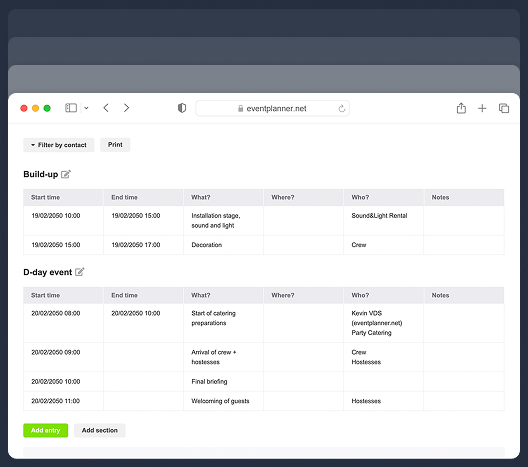
Call Sheets
Create a task list for pre-event and event days. Organise your team so everyone knows their responsibilities.
Suppliers
Manage every event partner from one workspace. Link them to budgets, call sheets, and the briefings they need.
Briefings
Build structured briefings that combine generic and supplier-specific instructions, all linked to the right partner.
Event Diagramming
Draw your event floor plan to scale, place tables, stages, bars and walls, and send the layout to your venue.
3D Event Design
Turn your floor plan into a 3D model, walk through it and view the venue before the event.
Plan / Seating
Design a floor plan, assign guests to seats, or let ticket buyers pick their own seat while ordering.
Control Access Before the Event
Good access control starts long before the doors open: with who gets a ticket, and how many.
Who Can Register
Decide who can get a ticket in the first place.
-
A public event page for open events.
-
A secret link or a password for private events.
-
Personal invitation links for your guest list.
-
Registration closes on your date or when you are full.
Capacity Under Control
Never let more people in than your venue can hold.
-
A maximum for the whole event.
-
A quantity per ticket type.
-
A maximum number of tickets per order.
-
Seats that can only be booked once.
Know Every Ticket Holder
Put a name on every ticket, so you know who is coming.
-
A name and e-mail address for every ticket holder.
-
Change the name on a ticket when plans change.
-
Cancel a ticket that should no longer get in.
-
Refunded tickets stop working straight away.
Control Access at the Door
On the day itself, every phone at the door knows exactly which tickets it may let in.
Scan With Any Phone
Turn the phones of your door team into ticket scanners.
-
Free app for iOS and Android.
-
As many phones as you need, at every entrance.
-
No barcode scanners or hardware to buy.
-
Scanning goes on when the connection drops.
A Safe Door Team
Give your stewards what they need, and nothing more.
-
Scanning only needs the read right on your tickets.
-
Two-factor authentication on every account.
-
Names anonymised on scanner phones by default.
-
Full names only when you switch them on.
Visible Proof of Entry
With .PRO, print a name badge the moment a guest is checked in.
-
A badge prints at the first valid scan.
-
The badge carries the ticket's own QR code.
-
Re-scan the badge at a zone or a session.
-
Stewards see at a glance who is checked in.
Access Control Is Part of Tickets
The tickets you sell or issue, your guest list and the scanner at the door all work from the same data.

Sell event tickets online
Paid tickets with secure Stripe payments, paid out to your own Stripe account.
Visitor and guest registration
Free registration and RSVP invitations for your guest list.
Ticket scanner
Everything about scanning and check-in with the eventplanner.net app.
Seating
Seated tickets show the guest's seat on the scan result.
Frequently Asked Questions
-
What is event access control?
Access control decides who gets into your event, where and when. It starts with who can get a ticket and how many tickets exist, and ends at the door, where every ticket is checked. With eventplanner.net, every ticket has its own QR code and your team scans it with the free app, so only valid tickets get in.
-
How do I stop people from using the same ticket twice?
Every ticket has its own QR code. The first scan checks the guest in, and every later scan of the same ticket turns yellow, at every entrance. This works as long as your phones are online: a phone that is offline cannot see the scans of the other phones, so keep your scanners online at busy entrances.
-
Can I give VIP guests access to separate areas?
Yes. Create zones, such as VIP or backstage, and choose per ticket type which zones it gives access to. Every phone at the door scans for one entrance or zone, and a ticket without access to that zone turns red.
-
Can I run a multi-day event with day tickets?
Yes. Add time slots for each day or session and choose which time slots each ticket type covers, so you can offer day tickets next to a full pass. At the door, you either enforce the time slots, so a ticket is refused outside its time slot, or only show them to your team.
-
What happens with cancelled or refunded tickets?
They stop working straight away: when someone tries to use one, the scanner turns red. A phone that is offline only learns about the change once it is back online.
-
Who in my team can scan tickets?
Everyone you invite as a contact on your event with at least the read right on your tickets. They log in with their own account, protected with two-factor authentication, and they do not need a .PRO licence of their own to scan.
-
Do I need special hardware for access control?
No. Any iPhone or Android phone or tablet with the free eventplanner.net app is a scanner. The only optional extra is a Bluetooth label printer, if you want to print name badges at check-in with .PRO. Read more about our ticket scanner and check-in.
-
Is the eventplanner.net ticketing tool GDPR-compliant?
Yes. Attendee data is treated as personal data under GDPR, with consent collection built into the registration flow, an attendee's right to access and deletion supported by default, and data stored on EU infrastructure. The platform is ISO 27001 certified. Two-factor authentication and role-based access protect the team-side data. More detail is on the security page.
free forever
Perfect for professionals and smaller event planning teams managing one event at a time.
from per seat/month
Great for professionals and larger teams managing multiple events at a time.
from per month
Perfect for organisations requiring custom solutions, advanced security, and dedicated support
Event Planning Software That Grows With You
Select a plan that matches your ambitions, whether you're managing a single event or running multiple projects simultaneously.