


Design Your Event Seating Plan and Fill Every Seat
Draw your floor plan, then seat your guest list yourself or let ticket buyers pick their own seat while ordering. One visual seating plan, connected to your tickets and RSVPs.
Trusted by 179.000+ Event Organisers












From Empty Floor Plan to Every Seat Filled
Stop wrestling with spreadsheets and printed table plans. Build the room once, then manage every seat visually, whether you assign guests yourself or sell reserved seats to buyers.
Draw the Room to Scale
- Set real venue dimensions.
- Add round tables, long tables, and seat rows.
- Place a bar, stage, or dance floor as decor.
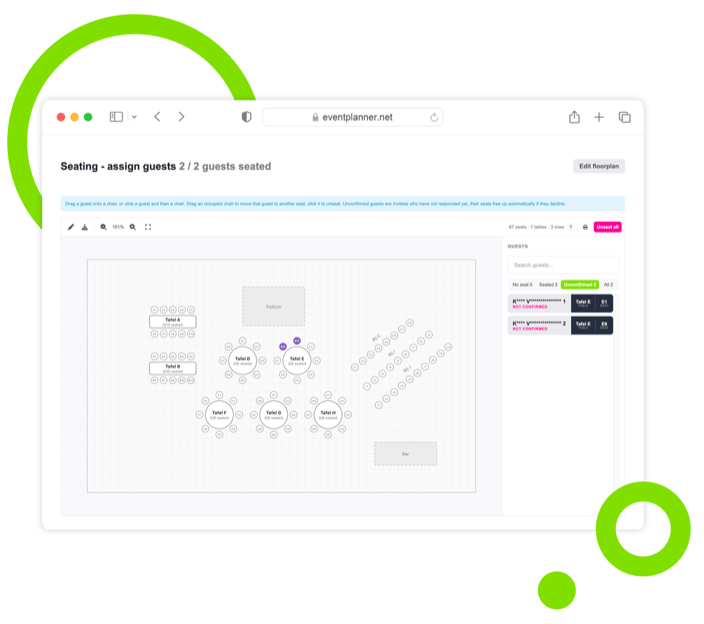
Seat Your Guest List
- Drag guests from your RSVP list onto seats.
- Move or unseat anyone with a single click.
- Filter by seated, unseated, or unconfirmed.
Let Buyers Pick a Seat
- Turn any ticket type into a reserved seat.
- Buyers choose their own seat while ordering.
- Best-available seats are proposed automatically.
Carry the Seat to the Door
- Print the seat on the ticket and PDF.
- Show the seat on scan at check-in.
- See live occupancy as seats sell.
Discover Your Event Planning Toolkit
See how your seating plan connects to ticketing, guest registration, and the rest of our event software.
Moodboards
Capture ideas, curate inspiration, and explore vendors to shape your event's vision, theme, and personality.
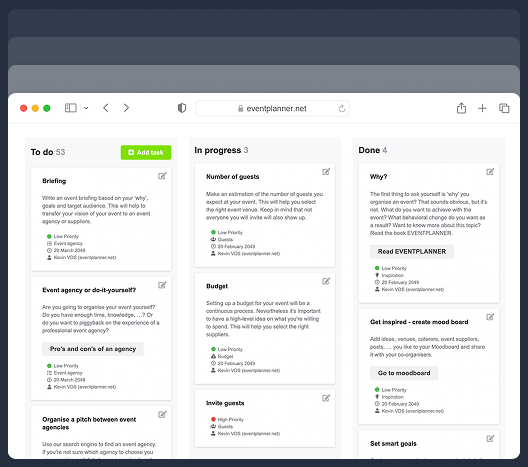
Checklists
Keep track of every planning detail. Create and assign tasks to your team members, and never miss a deadline.
Budgets
Manage your event budget and expenses. Get a complete overview of fund allocation and track your spending.
Ticketing
Generate event tickets and manage on-site registration. Create easy check-in experiences for your attendees.
Call Sheets
Create a task list for pre-event and event days. Organise your team so everyone knows their responsibilities.
Suppliers
Manage every event partner from one workspace. Link them to budgets, call sheets, and the briefings they need.
Briefings
Build structured briefings that combine generic and supplier-specific instructions, all linked to the right partner.
Diagramming
Draw your event floor plan to scale, place tables, stages, bars and walls, and send the layout to your venue.
The Seating Plan Designer
A drag-and-drop floor plan builder for tables, rows, and zones, drawn to the real dimensions of your venue.
Draw the Venue to Scale
Recreate your room on a visual canvas so the seating plan matches the real space.
-
Set the room width and depth in metres or feet.
-
Add round, square, and long tables.
-
Drop in seat rows for theatre-style layouts.
-
Mark decor like a bar, stage, or dance floor.
Number and Block Seats
Keep every chair uniquely labelled and take unsellable seats out of play.
-
Auto-number tables and rows on creation.
-
Set odd, even, or straight row numbering.
-
Override any individual seat label by hand.
-
Block seats with an obstructed view or hold.
Edit Without Fear
Reshape the room as your plan evolves, with every change saved as you work.
-
Undo any change with a full history.
-
Zoom and pan around large layouts.
-
Duplicate a table and keep unique labels.
-
Autosave keeps your plan up to date.
Guest Assignment for RSVP Events
Perfect for weddings, galas, and dinners: decide who sits where, and let the plan follow your guest list.
Assign Guests to Seats
Place your RSVP guest list on the plan by dragging names onto chairs.
-
Drag a guest onto any open seat.
-
Move a seated guest to another chair.
-
Click a seat to unseat a guest instantly.
-
Seat unconfirmed invitees as placeholders.
Keep the Plan in Sync
Your seating plan updates itself as guests respond to their invitation.
-
Declined invitees free up their seats.
-
Confirmed guests transfer to real seats.
-
Filter by seated, unseated, or unconfirmed.
-
Get a warning when guests outnumber seats.
Find Anyone Fast
Handle a long guest list without losing track of who still needs a seat.
-
Search the guest list by name.
-
Filter to just the guests without a seat.
-
See seated and unseated totals at a glance.
-
Spot unconfirmed invitees before you finalise.
Reserved Seating for Ticketed Events
Let attendees choose their own seat while they register, the way they pick seats for a concert or show.
Offer Reserved Seats
Add a seat-selection step to registration for any ticket type you mark as seated.
-
Turn any ticket type into a reserved seat.
-
Mix seated and general-admission tickets.
-
Propose the best-available seats together.
-
Hold seats while the guest completes their order.
Guide Guests to Good Seats
A clear, mobile-friendly seat picker that helps attendees choose without leaving gaps.
-
Attendees adjust their seats on the plan.
-
Avoid stranded single-seat gaps automatically.
-
Pick seats on mobile with pinch and zoom.
-
Prevent double-booking with live seat holds.
Every Ticket Knows Its Seat
After checkout, the chosen seat is confirmed and delivered with the ticket.
-
Seat prints on the ticket and the PDF.
-
Seat appears in the confirmation email.
-
Availability counts free seats, not just stock.
-
Booked seats stay put once the event is live.
Occupancy, Print, and Check-in
From a live occupancy view to app check-in and printed backups, the seat follows the guest all the way through.
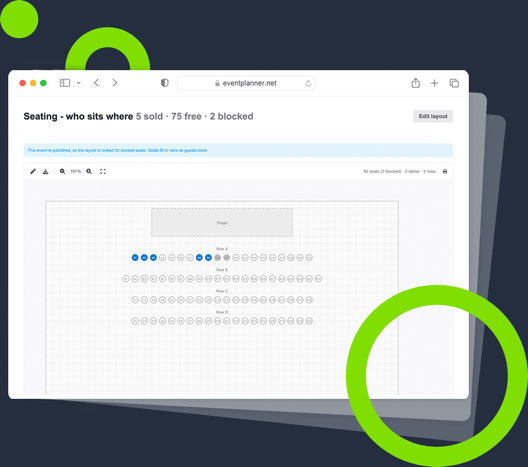
See Who Sits Where
Track your room in real time and keep booked seats safe once you go live.
-
Watch seats fill in as tickets sell.
-
Read sold, free, and blocked at a glance.
-
Lock booked seats against accidental edits.
-
Keep editing the rest of the plan safely.
View and Check In From the App
Open the live seating plan in the eventplanner.net app on the day, scan tickets at the door, and keep printouts as a backup.
-
View the live floor plan in the app during the event.
-
Scan tickets at the door and see each seat.
-
Print the floor plan with guest names or seat numbers.
-
Export the full seating list to Excel per table.
Share Access With Your Team
Select who on your team needs acces. Grant read or write access to exactly the users you want in the plan.
-
Managers design the plan and assign seats.
-
Read-only teammates can view and print.
-
Give a venue or production contact the floor plan and nothing else.
-
Guest details stay protected by default.
One Seating Plan for Every Kind of Event
Whether you seat guests by hand or sell reserved seats to the public, it is the same visual plan, connected to the tickets, guest list, and budget you already manage here.
Weddings and Galas
Build a table plan, seat your guest list by hand, and print place-ready seating lists per table.
Concerts and Shows
Sell reserved seats and let buyers pick their own spot, with the seat printed on the ticket.
Conferences and Dinners
Mix seated and standing tickets, or assign VIP tables while the rest of the room stays open.
Connected to Everything
Your seating plan lives beside ticketing, guest registration, budgets, and the rest of your event.
Frequently Asked Questions
-
What is event seating plan software?
Event seating plan software lets you draw your venue on a screen and manage every seat visually, instead of on paper or in a spreadsheet. With eventplanner.net you draw the room to scale, add tables and rows, and then either assign your guest list to seats yourself or let ticket buyers choose their own seat while ordering. Because it is part of the wider event software, the seating plan is connected to your tickets, guest registration, and budget rather than being a separate standalone tool.
-
What is the difference between a seating plan and a seating chart?
They mean the same thing. "Seating plan" and "table plan" are the common terms in the UK and Europe, while "seating chart" is more common in the US. All of them describe a visual map of who sits where. eventplanner.net covers both: a table plan for a seated dinner or wedding, and a numbered seat map for a ticketed show.
-
Can guests choose their own seat when they buy a ticket?
Yes. Mark a ticket type as seated and a seat-selection step appears during checkout. The buyer sees your plan, gets the best-available seats proposed automatically, and can adjust their choice on the map. Their seats are held while they pay, so two people can never book the same chair. This is the reserved-seating or assigned-seating experience people know from concert and theatre tickets.
-
How do I assign guests to tables for an RSVP event?
Open the assign view and drag guests from your RSVP list onto seats on the plan. You can move a seated guest to another chair, click a seat to unseat someone, and filter the list by seated, unseated, or unconfirmed. Guests who have not responded yet appear as placeholders you can already seat, and their seats free up automatically if they decline.
-
Can I make a wedding seating plan or table plan?
Yes. Weddings are one of the most common uses. Draw your round or long tables, seat each guest by hand, and print a seating list grouped per table for the caterer and the venue. Couples and planners using eventplanner.net as wedding planning software get the seating plan alongside the budget, checklist, and guest list in one connected workspace.
-
Does the seat show on the ticket and at check-in?
Yes. Once a seat is booked, it prints on the ticket and the PDF, appears in the confirmation email, and shows up when your team scans the ticket at the door. Staff see exactly which seat each guest holds as they check in.
-
Can I mix seated and general-admission tickets?
Yes. Seating is set per ticket type, so you can sell reserved seats for one type and open standing tickets for another at the same event, for example a seated grandstand plus a standing floor. Ticket types you do not mark as seated skip the seat-selection step entirely.
-
Does seating work with the ticketing tool?
Yes. Seating is built into the event ticketing software: mark a ticket type as seated, and attendees choose their own seat while they register, with the seat printed on the ticket and shown at check-in. Because seating and ticketing share the same event, capacity and check-in stay in sync automatically.
-
Can I print my seating plan and export a seating list?
Yes. Print the floor plan itself with guest names or seat numbers, and export a seating list to Excel, grouped per table or row. It is an easy handover for the caterer, the venue, or anyone working the room.
-
What happens to booked seats if I edit the plan after going live?
Once your event is selling, booked seats are protected. You can still add tables, relabel decor, or open more seats, but you cannot delete or block a seat someone has already paid for. That keeps every buyer's seat safe while you keep working on the rest of the plan.
-
Is the seating tool free?
Seating is part of eventplanner.PRO. You can create your account and explore the event software for free, with pricing for .PRO published on the event software pricing page rather than hidden behind a sales call.
-
Can I use the plan for more than seating?
Yes. The same canvas draws the whole room, not only the chairs: walls, doors, a stage, a bar, gangways and zones, all to scale, with dimensions you can print. If that is what you are after rather than who sits where, start from our event diagramming software.
-
How big a venue can one seating plan handle?
A single plan comfortably handles venues up to around two thousand seats, which covers the vast majority of weddings, dinners, conferences, and mid-size shows. The canvas stays responsive on desktop and mobile as your layout grows.
free forever
Perfect for professionals and smaller event planning teams managing one event at a time.
from per seat/month
Great for professionals and larger teams managing multiple events at a time.
from per month
Perfect for organisations requiring custom solutions, advanced security, and dedicated support
Event Planning Software That Grows With You
Select a plan that matches your ambitions, whether you're managing a single event or running multiple projects simultaneously.