


Coordinate Every Event Partner with Supplier Management
Bring caterers, AV crews, venues, decorators, and security into one connected workspace. Manage contacts, contracts, communication, tasks, and budgets per supplier - without juggling email threads or shared drives.
Trusted by 179.000+ Event Organisers












Take Control of Every Partner Behind Your Event
Stop chasing supplier details across inboxes, spreadsheets, and shared drives. Centralise every partner, every conversation, and every commitment in one place.
Centralise Every Partner
- Keep contact details for every supplier in one place.
- Link suppliers directly to the events they are part of.
- Reach the right person without searching old threads.
Streamline Communication
- Bundle messages, notes, and decisions per supplier.
- Keep meeting outcomes attached to the right partner.
- Avoid information loss when team members rotate.
Define Once, See Everywhere
- Define tasks, budget lines, and call sheet rows once.
- Open any supplier and see everything tied to them in one view.
- Skip the duplicate data entry that comes with disconnected tools.
Work Better as a Team
- Give your team a single source of truth on partners.
- Stop duplicating supplier entries across tools.
- Keep everyone working from the same data.
Discover Your Event Planning Toolkit
Learn how Supplier Management connects to the rest of your event software.
Moodboards
Capture ideas, curate inspiration, and explore vendors to shape your event's vision, theme, and personality.
Checklists
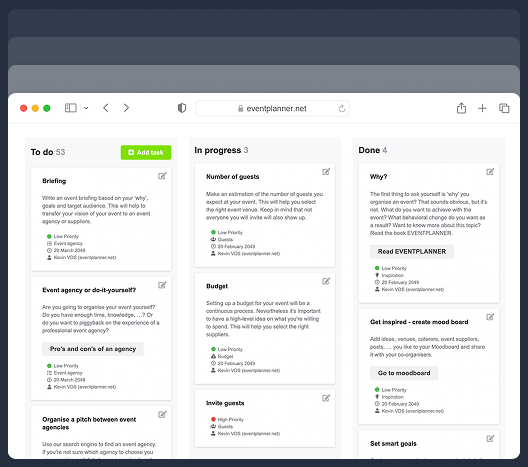
Keep track of every planning detail. Create and assign tasks to your team members, and never miss a deadline.
Budgets
Manage your event budget and expenses. Get a complete overview of fund allocation and track your spending.
Ticketing
Generate event tickets and manage on-site registration. Create easy check-in experiences for your attendees.
Call Sheets
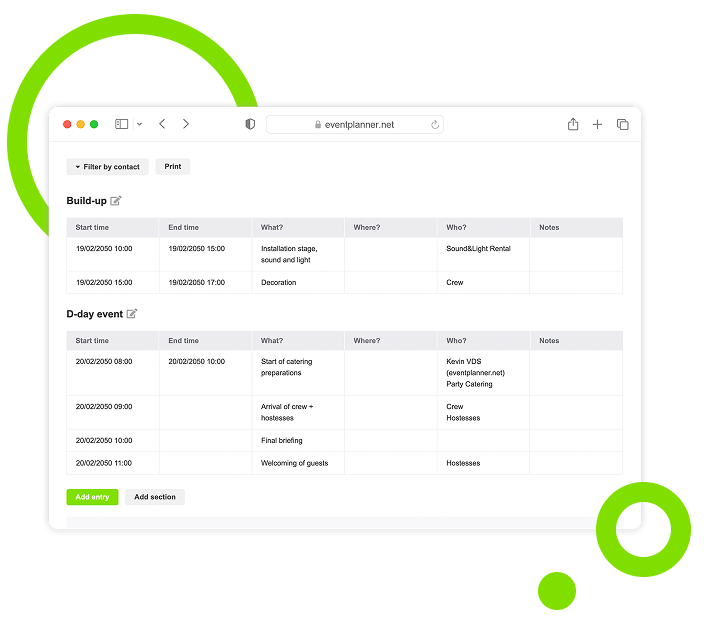
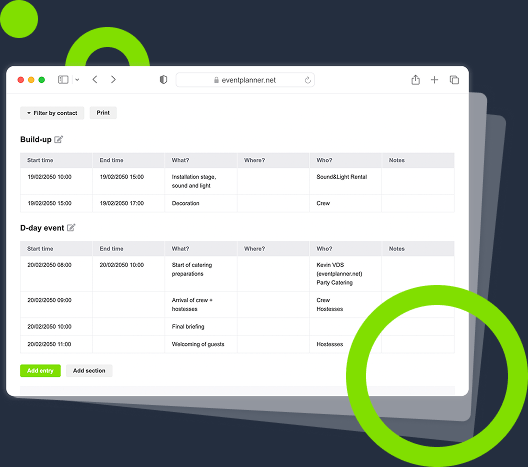
Create a task list for pre-event and event days. Organise your team so everyone knows their responsibilities.
Briefings
Build structured briefings that combine generic and supplier-specific instructions, all linked to the right partner.
Diagramming
Draw your event floor plan to scale, place tables, stages, bars and walls, and send the layout to your venue.
Plan / Seating
Design a floor plan, assign guests to seats, or let ticket buyers pick their own seat while ordering.
Bring Suppliers Into Your Event
Choose the fastest route to a complete supplier list - pull from our directory, add your trusted partners, or reuse what worked before.
Add From Our Directory
Pull suppliers directly from our directory of vetted businesses.
-
Import details with a single click.
-
Skip the manual data entry on every new event.
-
Get a verified profile that updates as the business updates.
-
Build your supplier list from established event partners.
Add Your Own Suppliers
Add partners that are not yet listed on the platform.
-
Capture every contact field you need internally.
-
Build a private supplier list only your team can see.
-
Reuse those partners across every future event.
-
Keep complete control over your partner network.
Reuse From Past Events
Bring trusted suppliers across from previous events.
-
Avoid re-entering the same data again and again.
-
Keep historical context, ratings, and notes intact.
-
Build a personal network you actually control.
-
Speed up planning on every subsequent event.
Supplier Profiles
Capture every detail about each partner in a structured profile that travels with them across events.
Store Contact Details
Tracking who to call when something goes wrong is half the job. Keep the right contact at your fingertips.
-
Save phone numbers, emails, and key contact people.
-
Add multiple contacts per supplier where needed.
-
Note who handles what: sales, operations, on-site lead.
-
Update once, and the whole team sees the change.
Track Communication History
Lost agreements end up in lost emails. Bundle all conversations for each supplier in one place.
-
Centralise message threads, notes, and contracts.
-
Stop searching inboxes for the latest agreement.
-
See what was promised and when at a glance.
-
Onboard new team members without re-explaining context.
Attach Documents and Files
Quotes, contracts, and confirmations have a way of vanishing when you need them. Pin them to the supplier instead.
-
Attach quotes, contracts, and insurance certificates per partner.
-
Find documents without digging through folders.
-
Share files securely with the rest of the team.
-
Keep an audit trail of every commitment per supplier.
Integrated With Your Event Planning
Define your tasks, budget lines, and call sheet rows once in your event - then open any supplier and see every detail tied to them. No double work, no copy-paste between tools.
Linked to Your Budget
Cost lines defined in your budget appear automatically in the supplier profile, and you can tag costs on the supplier side too. The total spend per partner stays current without any reconciliation.
-
Link supplier costs to budget categories from either side.
-
See total spend per supplier without exporting spreadsheets.
-
Compare estimated and actual costs side by side.
-
Spot budget drift before it becomes a problem.
Linked to Your Call Sheet
Tag a call sheet row to a supplier in your run-of-show, and it appears on the supplier profile. Open a supplier, and you see exactly when they are up. The view runs both directions, so the run-of-show and the supplier list stay in lockstep.
-
Tag suppliers to specific call sheet items from either side.
-
See exactly who is doing what at every moment of the day.
-
Update once and the call sheet, supplier view, and brief stay aligned.
-
Avoid the "who is handling that?" moment on event day.
Linked to Your Tasks
Tasks defined in project management can be assigned to a supplier, and per supplier, you see every open task across the event. No more switching tools to check status, no more missed deadlines hidden between systems.
-
Create tasks once in project management and tag the supplier.
-
View every open task per partner inside their profile.
-
Track deadlines and progress without leaving the supplier view.
-
Get accountability that is visible from both ends.
Onboarding and Templates
Bring new partners up to speed quickly with structured workflows that scale across every event you organise.
Use Onboarding Checklists
New suppliers need contracts, briefings, and access - and missing any of them costs you. Standardise onboarding once.
-
Make sure every new partner gets the right contracts and briefings.
-
Standardise onboarding across every event you run.
-
Reduce back-and-forth getting partners ready to deliver.
-
Spot missing information before it becomes a delay.
Build Reusable Templates
Most supplier categories have repeatable requirements. Capture them once and apply them everywhere.
-
Create templates for caterers, AV, security, and more.
-
Apply standard requirements to every supplier of that type.
-
Save time on every new event you set up.
-
Keep quality consistent across recurring events.
Connect Briefings Automatically
Briefings stay accurate when they are tied to live supplier data. Link the two and skip the copy-paste.
-
Generate supplier-specific briefings tied to the partner profile.
-
Update supplier details and watch the brief stay current.
-
Send the right brief to the right partner with one click.
-
Stop sending outdated documents into the wrong hands.
Team and Collaboration Controls
Give your team and partners controlled access to the right information, with clear permissions and roles.
Share Supplier Data With the Team
Duplicated supplier records and conflicting communications come from siloed lists. Give the team one shared workspace.
-
Give every team member access to the full supplier list.
-
Avoid duplicate entries and version conflicts.
-
Keep team communication aligned with the same data.
-
Onboard new team members faster at each event.
Set Permission Levels
Not everyone needs to see commercial terms. Grant the appropriate level of access for each role.
-
Decide who can edit, comment on, or simply view supplier data.
-
Protect sensitive financial and contractual information.
-
Maintain accountability with clearly defined roles.
-
Adjust access as the project moves through phases.
Coordinate Across Multiple Events
Running several events in parallel multiplies the chance of double-booking. Keep a clear view across everything.
-
See which suppliers are involved in which events.
-
Spot scheduling conflicts before they happen.
-
Reuse trusted partners with full historical context.
-
Manage relationships at the agency level, not per project.
Supplier Management, Built Into Your Event Software
Stop juggling tools to track who is doing what. Bring every partner into a connected workspace where context, contacts, and commitments live together - and stay in sync with the rest of your event.
One Workspace, Designed for Clarity
Every supplier, every conversation, every document in a single hub. No more switching between five tools to find what you need.
One Profile, Designed for Context
A complete record per partner, including history, agreements, and decisions, ready the moment you need it.
One Network, Designed for Reuse
Build a private network of trusted partners that travels with you from event to event, project to project.
One Source, Designed for Truth
Keep your team, call sheet, budget, and briefings working from the same supplier data - automatically.
Frequently Asked Questions
-
How do I start using Supplier Management?
Sign up for an account, create an event, upgrade to .PRO and you will find the Suppliers tool in your event workspace. From there, you can pull suppliers from our directory, add your own private partners, or reuse suppliers from past events.
-
Can I add suppliers that are not on eventplanner.net?
Yes. You can add any partner manually, including the contact details and any notes you need. They will be visible only to your team and stay reusable across every future event you organise.
-
How does Supplier Management integrate with the other tools?
Suppliers connect directly to your budgets, call sheets, checklists, and briefings. When you link a supplier to a budget line, a call sheet row, or a brief, that data stays in sync across every tool.
-
Can I reuse suppliers across multiple events?
Yes. Once a supplier is in your account, you can attach them to any future event with a click. Their contact details, history, and any documents you have stored remain available - so you do not start from scratch every time.
-
What is the difference between Supplier Management and a CRM?
You could call it an event CRM. The core idea is the same: a single profile per partner, with every interaction, document, and commitment attached. The difference is what is tracked: not a sales pipeline of customers, but every supplier linked to specific events, budgets, call sheet rows, and briefings - with the workflows event teams actually need.
-
Who on my team can see supplier data?
You control that. Set permissions per team member: read-only, no or full edit access - and protect sensitive commercial information from people who do not need to see it.
-
How does this connect with Briefings?
Each brief can be linked to a supplier profile, and supplier-specific sections are visible only to the relevant partner. When supplier details change, the brief stays in sync - no more re-sending outdated documents.
-
Is Supplier Management included in the free plan?
No. Supplier Management is part of eventplanner.PRO, our professional tier built for teams managing multiple suppliers and complex events.
-
Can I import a list of suppliers I already use?
Yes. You can add suppliers manually, pull them from our directory, or reuse them from previous events. For larger imports, contact us through the in-app chat, and we will help you get set up.
-
Why is eventplanner.net Supplier Management better than spreadsheets or a generic CRM?
Spreadsheets break the moment data changes - and a CRM does not understand events. Our Supplier Management is built specifically for event teams: it links partners to budgets, briefings, and call sheets, so updates flow through your entire event automatically. You do not get that from any tool that was not designed around how events actually run.
-
Can I keep a private list of preferred or approved suppliers?
Yes. The supplier list inside your account is private - only your team can see it. You can pull suppliers from the public eventplanner.net directory, add your own (including those not listed publicly), and reuse them across every future event. Many agencies and corporate teams use this as their internal 'preferred supplier list', with notes on past performance, agreed rates, and contractual specifics that are not visible outside the team.
-
How do I onboard a new supplier efficiently?
eventplanner.net supports onboarding checklists at the supplier level - a standard set of steps (contract signed, insurance certificate received, briefing acknowledged, single point of contact confirmed) that you apply to every new partner. This means the same onboarding rigour repeats across every event, and missing pieces - an unsigned contract, an outdated certificate - surface before they become a delivery risk. Many teams build onboarding templates per supplier category (caterer, AV, security, decorator) so the right standard requirements are applied automatically.
-
Can I track supplier performance across events?
Yes - privately, alongside the public reviews on the directory. Each supplier profile in your account holds your team's notes, ratings, and history across every event you've used them on. This gives you an internal track record that does not depend on public reviews and helps with decisions like which caterer to use for the next high-stakes event. The book EVENTPLANNER by Kevin Van der Straeten covers supplier evaluation as part of the post-event review process, which is where this kind of structured note-taking pays off most.
-
How does this differ from a CRM like HubSpot or Salesforce?
A CRM is built around a sales pipeline - leads, opportunities, deals. Supplier management is built around the operational relationship with event delivery partners - contracts, briefings, run-of-show rows, and budget lines. The two overlap conceptually (both centralise contacts and history), but the workflows are different. A CRM does not understand that a supplier owes you a load-in time and a delivery confirmation; supplier management is built around exactly those event-specific commitments. You could call eventplanner.net's supplier management an 'event CRM', with the caveat that what's tracked is operational, not commercial.
free forever
Perfect for professionals and smaller event planning teams managing one event at a time.
from per seat/month
Great for professionals and larger teams managing multiple events at a time.
from per month
Perfect for organisations requiring custom solutions, advanced security, and dedicated support
Event Planning Software That Grows With You
Select a plan that matches your ambitions, whether you're managing a single event or running multiple projects simultaneously.