


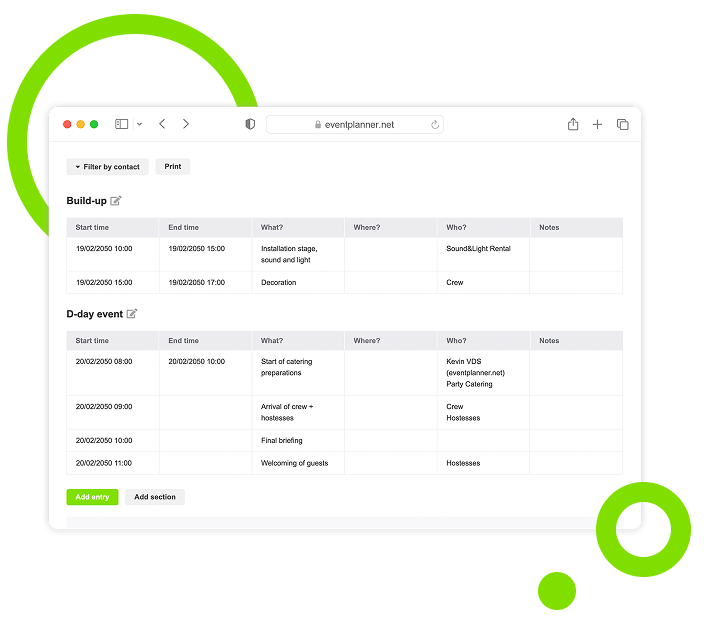
Send Personalised Event Briefings to Every Stakeholder with Briefings
Build highly personalised event briefings for each stakeholder effortlessly. Share them with the right people, keep every version up to date, and connect everything to the rest of your planning.
Trusted by 179.000+ Event Organisers












Send Each Stakeholder Exactly the Brief They Need
One brief for everyone usually means most of it is irrelevant to most people - and writing a separate document per partner takes hours you do not have. Build briefings that personalise themselves for each stakeholder, without manual rewriting.
Personalise Per Stakeholder
- Send every stakeholder only the sections that apply.
- Target by partner, category, or team member.
- Cut the noise that buries the details that matter.
Keep Everyone in Sync
- Update once and notify everyone affected.
- Prevent outdated versions floating in inboxes.
- Track who has seen the latest brief at a glance.
Connect to Your Planning
- Pull venue, timing, and supplier data automatically.
- Link briefings directly to suppliers and call sheets.
- Keep brief content in lockstep with the rest of the event.
Save Hours, Effortlessly
- Reuse templates across recurring event types.
- Skip the copy-paste cycle between separate tools.
- Spend more time on the event itself, less on documents.
Discover Your Event Planning Toolkit
Learn how Briefings connects with the rest of your event software.
Moodboards
Capture ideas, curate inspiration, and explore vendors to shape your event's vision, theme, and personality.
Checklists
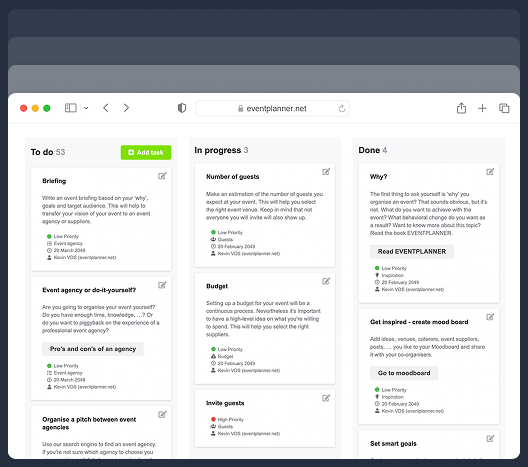
Keep track of every planning detail. Create and assign tasks to your team members, and never miss a deadline.
Budgets
Manage your event budget and expenses. Get a complete overview of fund allocation and track your spending.
Ticketing
Generate event tickets and manage on-site registration. Create easy check-in experiences for your attendees.
Call Sheets
Create a task list for pre-event and event days. Organise your team so everyone knows their responsibilities.
Suppliers
Manage every event partner from one workspace. Link them to budgets, call sheets, and the briefings they need.
Diagramming
Draw your event floor plan to scale, place tables, stages, bars and walls, and send the layout to your venue.
Plan / Seating
Design a floor plan, assign guests to seats, or let ticket buyers pick their own seat while ordering.
Briefing Setup Options
Choose the fastest route to a finished brief - start clean, build on what worked before, or use a structured starting point.
Start From a Blank Brief
Build a custom briefing from the ground up.
-
Add sections in the order that fits your event.
-
Adjust structure freely as the event takes shape.
-
Keep total control over every detail and tone.
-
Move from draft to shareable briefing without extra tools.
Reuse a Past Briefing
Build on the success of a previous event.
-
Speed up briefing creation for recurring formats.
-
Keep tone and structure consistent across events.
-
Reduce planning errors with proven frameworks.
-
Adapt previous briefs quickly for new stakeholders.
Briefing Structure
Build briefings that combine the context everyone needs with the specific instructions each partner needs.
Create Generic Sections
Some information every partner needs to read - from venue access to safety protocols. Set the foundation once.
-
Share core event details every supplier needs to know.
-
Set the scene with venue, timing, and key contacts.
-
Communicate brand and tone-of-voice in one place.
-
Keep the foundation aligned across every partner.
Add Supplier, Category, or Individual Specific Sections
Caterers do not need the AV plan. Security does not need the menu. Send each partner, or even team member, only what is relevant to their role.
-
Tailor instructions per partner: caterer, AV, security, decor.
-
Include only what each supplier needs to deliver.
-
Keep sensitive information private to the right team.
-
Avoid information overload that buries the important details.
Linking to Your Event Data
Pull live event data directly from your other tools - no copy-paste, no version mismatches.
Auto-Populate Event Details
Date changes. Venue confirmations. Time slot adjustments. Let the brief stay current automatically.
-
Pull venue, date, and timing from your event setup.
-
Sync changes across the brief automatically.
-
Avoid mistakes from outdated information.
-
Keep one source of truth for every detail.
Connect to Suppliers
A brief belongs to the partner it is for. Link them directly and keep everything in context.
-
Link briefings to specific supplier profiles.
-
Send the right brief to the right partner with one click.
-
Track which suppliers received which version.
-
Keep all communication in one connected place.
Tie to Call Sheets and Tasks
Run-of-show details and brief content should never drift apart. Connect them once and let updates flow.
-
Reference call sheet items inside the brief.
-
Link to specific tasks each partner is responsible for.
-
Keep everyone aligned with the same timeline.
-
Update one source and the rest stays in sync.
Sharing and Collaboration
Send briefings to the right people, the right way, with full visibility into who has seen what.
Share With Suppliers Directly
PDF attachments and version-control folders are how briefs get lost. Share through a live link instead.
-
Send briefings via secure link or give direct access.
-
Skip attachments and shared-drive permissions.
-
Make sure suppliers always see the latest version.
-
Track when each partner has accessed the brief.
Co-Edit With Your Team
Briefs written across email threads end up inconsistent. Work together in real time on the same document.
-
Edit with co-organisers in real time.
-
Avoid conflicting changes from parallel email drafts.
-
See who changed what and when.
-
Keep editorial voice consistent across the team.
Manage Access Levels
Some sections are not for everyone. Decide who can read, comment, or edit each part of the brief.
-
Decide who can read, comment, or edit each section.
-
Protect sensitive sections from external partners.
-
Give clients view-only access where appropriate.
-
Adjust permissions as the event approaches.
Versions and Updates
Keep every brief current - and let everyone know the moment something changes.
Track Versions
The "wrong version" mistake costs hours and damages trust. Make the current brief unambiguous.
-
See which version is the current source of truth.
-
Avoid sending outdated information by mistake.
-
Keep a history of changes for accountability.
-
Roll back if something needs reverting.
Choose Who Sees What
Every section has its own audience. Target a category, a partner, or a team member.
-
Target a section to a specific named partner.
-
Group by category - all caterers, all AV, all security - and address them together.
-
Address sections to individual team members or internal stakeholders.
-
Combine all three levels in one brief: generic, group, and individual.
Briefings That Personalise Themselves
Stop writing one brief and rewriting it five times. Build a single, structured brief that automatically tailors itself per stakeholder, syncs with the rest of your event, and keeps every partner on the latest plan - without the manual work.
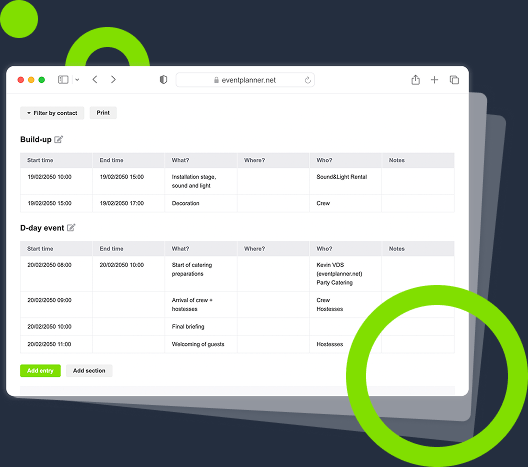
One Brief, Tailored for Each
A single source of truth that automatically delivers the right sections to the right stakeholder - shared context for everyone, role-specific instructions for each partner, with no separate documents to maintain.
One Source, Designed for Sync
Pull event details from the rest of your planning, so every brief reflects the latest information without manual updating.
One Workflow, Designed for Speed
Reuse templates, share via link, and notify partners on every update - without leaving the event software.
One Audience, Designed for Each Role
Every partner or team member sees exactly what they need to deliver, nothing more - no buried details, no irrelevant noise.
Frequently Asked Questions
-
What is an event briefing and why does it matter?
An event briefing is the document that bridges your vision and its execution. It tells every partner - supplier, crew member, venue contact - what is expected of them, when, and how. A clear, complete brief is what makes the difference between an event that runs smoothly and one that depends on phone calls and improvisation.
-
How is this different from sending a Word document?
A Word document lives in someone else's inbox or on someone else's laptop. The moment something changes, you send a new version and hope everyone uses it. Briefings is built around live data: when the venue, timing, or supplier details change, the brief stays current and you can see who has and has not read the latest version.
-
Can I send different sections to different suppliers?
Yes. You can build a generic section that goes to everyone and supplier-specific sections that go only to the relevant partner. The caterer gets what the caterer needs; the AV team gets what the AV team needs. You can even add sections for specific team members or for supplier categories.
-
How does Briefings connect with Supplier Management?
Each brief can be linked directly to one or more supplier profiles in Supplier Management. Supplier-specific sections automatically go to the right partner, and supplier details stay in sync across both tools.
-
Can my team work on a brief together?
Yes. Multiple team members can edit the same brief simultaneously, with full history of who changed what. You can also set permission levels - read, comment, or full edit - per team member or external partner.
-
What happens when something changes at the last minute?
Update the brief, and partners see the updated briefing immediately.
-
Is Briefings included in the free plan?
No. Briefings is part of eventplanner.PRO, our professional tier built for teams running complex events that depend on tight coordination across many partners.
-
Why is eventplanner.net Briefings better than tools like Word, Notion, or Google Docs?
General-purpose document tools do not understand events. Briefings is built specifically for event teams: it pulls in live event data, links directly to supplier profiles, ties to your call sheet, and tracks acknowledgement per partner. You do not get any of that from a generic document tool - and the time it saves on every event makes the difference clear quickly.
-
What should an event briefing include?
A complete briefing covers four sections. The why and the goal - why is the event happening, what does success look like, who is the audience and what's their profile. The event itself - date, duration, location (if chosen), theme, programme outline, internal and external communication channels available. The supplier-specific expectations - what you want from this particular partner, what you absolutely do not want, the desired atmosphere and quality level (without dictating the exact solution, which limits creativity). The constraints - budget indication, deadlines, single point of contact on each side. The book EVENTPLANNER by Kevin Van der Straeten lays out the full briefing structure with worked examples; the Briefings tool in eventplanner.net is built around the same logic, with sections that can be generic or supplier-specific.
-
How is an event briefing different from an RFP?
An RFP (request for proposal) is typically a procurement document - a structured set of questions sent to multiple vendors competing for the same scope, with a formal evaluation process. A briefing is the working document shared with the partner you've already selected: it tells them what they need to know to deliver well. Some events use both (an RFP to select the partner, then a briefing before the event); many smaller or faster-moving events skip the formal RFP and go straight to a briefing. Either way, the briefing's job is the same: align the partner with the event so they can deliver on the day.
-
How long should an event briefing be?
Long enough to remove ambiguity, short enough that suppliers actually read it. For a single supplier on a focused scope (a catering brief, an AV brief), 2-4 pages is usually right. For a complex event with many partners, the total briefing may be 15-20 pages, but no single supplier should see all of it - each should see the generic context (who, why, where, when) plus the section that applies to them. The personalisation logic in eventplanner.net's Briefings tool is designed exactly for this: one structured document, automatically tailored per recipient, so each partner reads only what concerns them.
-
Can suppliers acknowledge a briefing so I know they've read it?
Yes. When you share a briefing via secure link, you can see who has accessed it and when (coming soon). For events where reading the briefing is critical (security plans, allergen information, access protocols), this gives you a record of acknowledgement that an emailed PDF cannot. Updates to the briefing trigger notifications to the relevant partners, so nobody is operating on an outdated version on the day.
free forever
Perfect for professionals and smaller event planning teams managing one event at a time.
from per seat/month
Great for professionals and larger teams managing multiple events at a time.
from per month
Perfect for organisations requiring custom solutions, advanced security, and dedicated support
Event Planning Software That Grows With You
Select a plan that matches your ambitions, whether you're managing a single event or running multiple projects simultaneously.