


Turn Planning Chaos Into Simple Workflows with Our Event Management Software
Events run on processes, not disjointed spreadsheets. Centralise your planning workflow, from vision to execution, into one collaborative, action-centered workspace.
Trusted by 179.000+ Event Organisers












20.403
event vendors
26.119
events
126.229
event planners
104
countries
Planning Events
Shouldn't Be This Hard
The Old Way
- Scattered tools drain your efficiency
- Endless email threads confuse teams
- No clear system to manage vendors
- Budgets, tasks & guest lists lost in spreadsheets
- Last-minute changes derail everything
- No centralised source of truth
- Missed deadlines and negative feedback
- No clear overview of what's happening
The eventplanner.net Way
- One platform with integrated solutions
- Real-time collaboration for alignment
- Vendor coordination made simple
- Live budget tracking with instant updates
- Automatic adaptation to changes
- Single source of truth for all stakeholders
- Deadlines met with effortless collaboration
- Full event visibility from start to finish
Plan and Execute Events
the Way You Work Best
Simplify event planning with solutions that fit your workflow. Oversee and manage every detail with ease.
Shape Events, Your Way
Every event is unique, and so is your approach. Use processes that align with how you think and plan.
- Adapt your event planning process to your work style.
- Plan tasks in a way that makes sense to you.
- Customise views to focus on what matters most.
- Adapt workflows as your planning evolves.
Connect Every Moving Piece
Keep your mind free by having every event detail, conversation, and decision where it's easy to find.
- Link related tasks, budgets, and documents.
- See how changes in one area affect others.
- Access any event detail in seconds.
- Maintain context across your entire event.
Keep Track Without the Stress
Focus on your event while the platform tracks progress and alerts you to what needs attention.
- Get notified about what matters, not everything.
- See real-time progress without asking for updates.
- Identify potential issues before they become problems.
- Monitor the deadlines without constantly checking.
Collaborate Without Extra Steps
Work with your team, vendors, and clients in a way that feels natural and keeps everyone aligned.
- Share exactly what each person needs to see.
- Keep conversations and decisions in context.
- Provide and receive updates effortlessly.
- Maintain clear ownership of tasks and decisions.
Your Event Planning Tech Stack, Unified
Move between creative planning, team coordination, and event execution. Your entire planning workflow, simplified and in sync.
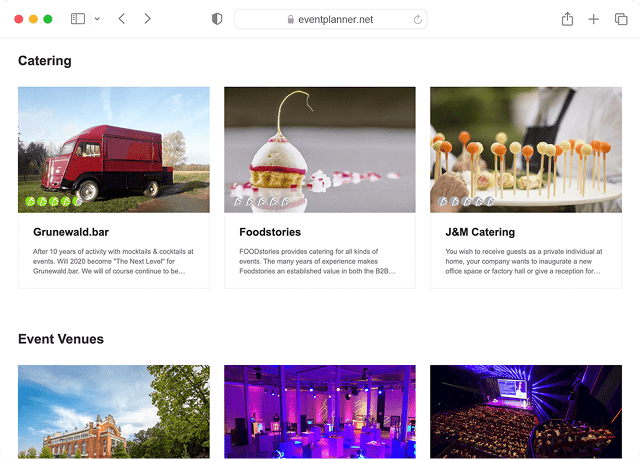
Moodboards
Turn inspiration into action. Curate ideas, find vendors, and connect creative decisions directly to your execution plan.
- Organise event concept with visual clarity
- Find and filter local vendors instantly
- Share ideas with clear context
- Connect creative decisions to tasks
- Keep inspiration organised and accessible
- Turn event vision into actionable plans
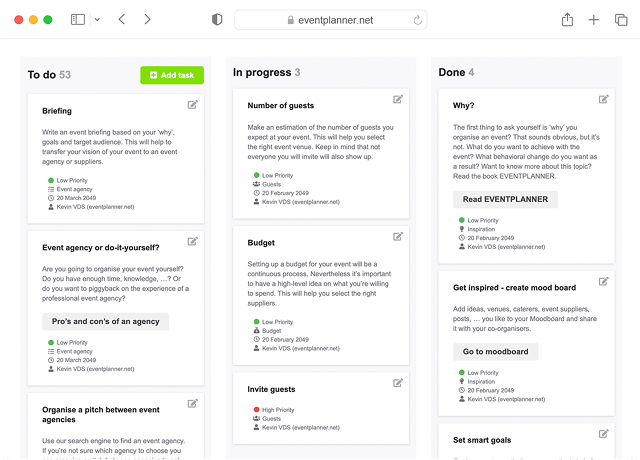
Checklists
Break down complex events into clear steps. Assign ownership, track progress, and maintain perfect coordination.
- Turn events into clear action plans
- Assign tasks with instant accountability
- Deploy proven event templates
- Connect tasks directly to vendors
- Collaborate with teams on different items
- Monitor completion in real-time
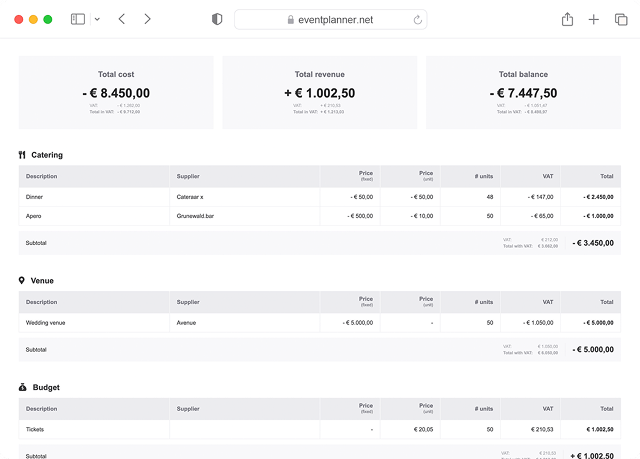
Budgets
Control your event budget. Track costs, view revenue updates, adjust to changes, and keep records in order.
- Monitor every cost in real-time
- Adapt budgets as plans change
- Plan for multiple scenarios
- Share updates with stakeholders
- Track profit margins instantly
- Support tax-inclusive & -exclusive pricing
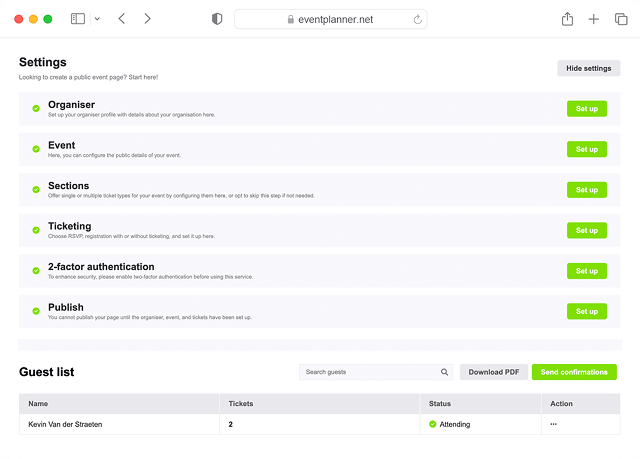
Tickets
Manage registration and attendance. Simplify ticketing and check-ins for a stress-free experience.
- Build flexible ticket types
- Configure capacity limits
- Automate the registration flow
- Protect attendee information
- Monitor registration in real-time
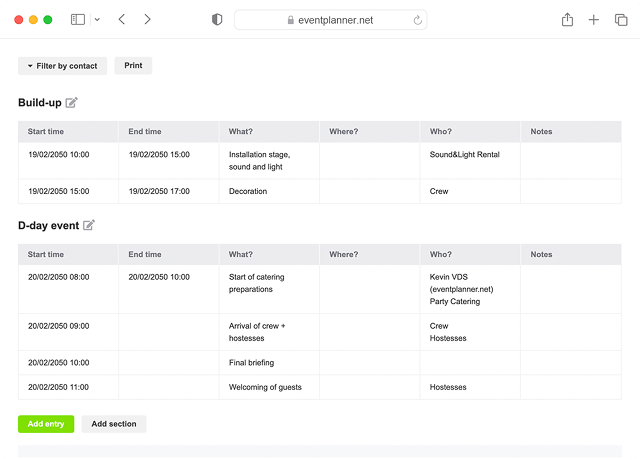
Call Sheets
Execute your event with precision. Coordinate teams, track progress, and maintain perfect timing.
- Structure timing with precision
- Give clear team instructions
- Access printable schedules offline
- Track execution in real-time
- Control information access
- Let teams view tasks in-app
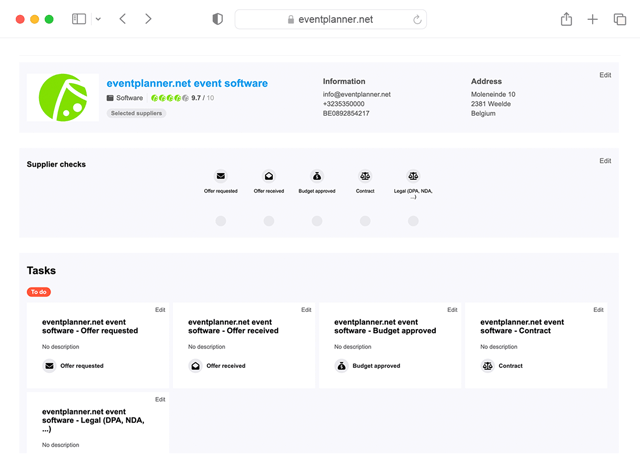
Suppliers
Centralize your supplier management. Track agreements, communication, and responsibilities per partner, all in one streamlined overview.
- Keep all supplier contacts and agreements in one place
- Track communication and files per partner
- Link suppliers to budgets, call sheets, and tasks
- Reuse trusted suppliers across events
- Coordinate teams with role-based supplier access
Briefings
Build one structured briefing and automatically tailor the right sections for each supplier, partner, and team member.
- Send role-specific instructions from one source
- Keep everyone on the latest version
- Link briefings to suppliers and call sheets
- Collaborate with your team in real time
- Control who can read, comment, or edit
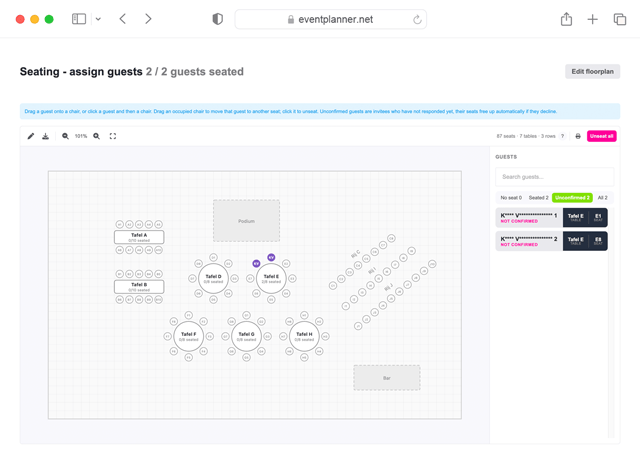
Seating
Design a seating plan for your venue, then assign guests to seats or let ticket buyers pick their own while ordering.
- Draw your venue and manage seats visually
- Assign your guest list or sell reserved seats
- Let guests pick their own seat at checkout
- Print floor plans and export seating lists
- Show the seat on the ticket and at check-in
Event Diagramming
Draw your event floor plan to scale, put everything that takes up floor space where it belongs, and hand the event layout to the people who have to build it.
- Draw walls, doors and the room to scale
- Place bars, buffets, stages and dance floors
- Trace the venue's own floor plan
- Measure distances and mark dimensions
- Share it, or export a print-ready PDF
Built for Every Event Type
No matter which events you're planning, our event management software scales with your ambition and adapts to your needs.
Corporate Events
From small team meetings to large-scale conferences, manage complexity with confidence and precision.
Conferences & Seminars
Product Launches
Team Building Events
Executive Meetings
Award Ceremonies
Annual Gatherings
Social Events
Handle every detail from concept to execution with perfect accuracy for once-in-a-lifetime experiences.
Weddings & Celebrations
Fundraising Galas
Private Functions
Birthday Milestones
Anniversary Parties
Charity Events
Public Events
Scale your planning to match any event size while maintaining control and reducing challenges.
Festivals & Concerts
Exhibition Shows
Sporting Events
Educational Forums
Cultural Celebrations
Community Gatherings
Discover Vendors From Your
Event Workspace
Search, evaluate, and work with vendors and venue providers directly from your event software.
Search for Event Vendors
Stop jumping between browser tabs and vendor websites. Find what you need with integrated search tools.
Filter vendors by location and event type.
Sort by categories, ratings, and availability.
Compare detailed vendor profiles side-by-side.
Save favourites directly to your event workspace.
Connect with Event Vendors
End the back-and-forth email chaos. Communicate with vendors right where you manage your event.
Reach out using an existing email template.
Request quotes with pre-filled event details.
Share event requirements in one click.
Track all vendor communications in context.
Collaborate with Event Vendors
Work with vendors to plan your event. Share timelines, manage responsibilities, and track their progress.
Assign to-dos directly to vendors.
Share relevant tasks and documents.
Track deliverables and deadlines.
Maintain communication history.
Enterprise-Grade Security
for Your Events
Keep your event data safe and compliant. Activate security features to protect sensitive event and attendee information.
Role-based access control
End-to-end encryption
ISO27001 certified
Built-in GDPR compliance
Secure data storage
Multi-factor authentication
Frequently Asked Questions (FAQ)
How quickly can I get started?
Launch your first event in minutes. Our guided setup and pre-built templates help you get started almost immediately.
Can I customize workflows for different event types?
Absolutely. Choose the event type when setting up a new event, and you'll access a checklist template with predefined tasks specific to that type of event. If you start a checklist from scratch, you can save it for future events.
How does vendor management work in the platform?
Access our vendor directory directly from your event workspace. Find vendors based on location and category, request quotes with pre-filled event details, and manage all communication in one place. Once selected, vendors can be given specific access to relevant tasks and timelines.
What happens if I lose internet connection during an event?
Our ticketing system works offline for check-ins, while other features like call sheets have printable backups available. Changes to check-ins sync automatically once you're back online.
Can I control what different team members and vendors see?
Yes. Set permissions for every user. Define exactly what information and tools each team member, vendor, or stakeholder can access. Change access levels instantly as needs evolve.
What kind of support do you provide?
Free users get access to our self-service resources, including knowledge base and free online training materials. .PRO users receive platform support via chat. Enterprise clients benefit from premium support with dedicated onboarding and customised support contracts.
How does the platform handle last-minute event changes?
Changes to schedules, tasks, or budgets instantly reflect across all relevant modules.
Is there a limit to how many events I can manage?
Free users can manage one active event at a time, with unlimited sequential events. .PRO users can manage unlimited concurrent events with no restrictions on team members or vendors.
How secure is my event and client data?
We implement enterprise-grade security measures including end-to-end encryption, regular security audits, and GDPR compliance. We're ISO27001 certified. Control data access with role-based permissions and multi-factor authentication.
What is event management software?
Event management software is the set of tools an organiser uses to plan, coordinate, and execute an event - from the first concept through to wrap-up. It typically covers moodboards and concept work, budgets, checklists, supplier and vendor coordination, briefings, run-of-show callsheets, and ticketing or guest registration. The category is broad, and most platforms specialise in one part of it. eventplanner.net is built around the organisational side of events: the planning, the team, the suppliers, and the execution. That makes it a different category than registration-led platforms like Eventbrite or Cvent, which are designed primarily around the guest-facing experience.
What is the difference between event management software and event registration software?
Event registration software is built for the attendee side: ticketing, sign-up flows, marketing emails, attendee data, and check-in. Event management software, in the broader sense, is built for the organiser side: budgets, supplier coordination, run-of-show, briefings, team tasks, event projectmanagement and the moving parts that decide whether the event runs smoothly on the day. Most well-known platforms - Eventbrite, Cvent, Bizzabo, Hopin - sit on the registration side. eventplanner.net sits on the organisational side, with ticketing included as one tool among many rather than as the centre of the platform.
What is the best event software for event agencies?
Event agencies typically need three things their clients do not: the ability to manage many parallel events, a private supplier network that travels from project to project, and clean role separation between the agency team and the client. eventplanner.net is built around exactly that workflow - multiple concurrent events, reusable supplier profiles, briefings that personalise per partner, and granular permissions so clients see only what they should. The .PRO tier is designed for agencies and in-house event teams; the free tier limits you to one active event at a time.
Is there a free version of eventplanner.net's event software?
Yes. The free plan gives one active event at a time with unlimited sequential events, and includes the core organising tools - moodboards, checklists, budgets, callsheets, and ticketing. There is no time limit and no credit card required. The .PRO tier unlocks unlimited concurrent events, supplier management and briefings. Pricing is published on the event software pricing page rather than gated behind a sales call.
Can clients and external stakeholders collaborate on the event with us?
Yes. You can invite clients, vendors, venue contacts, or external team members into specific parts of the event with the access level that fits their role - read-only, comment-only, or full edit. Clients can co-build the moodboard, sign off the budget, or follow the checklist without seeing internal commercial information. Suppliers can see only the briefing sections and tasks tied to their part of the event. The point of this is the same as why agencies use shared workspaces: fewer email threads, less version drift, one source of truth for everyone working on the event.
How is eventplanner.net different from all-in-one platforms like Cvent or Bizzabo?
Cvent, Bizzabo, Hopin and most large enterprise platforms in this category are built primarily around the attendee experience - registration funnels, marketing automation, attendee engagement, networking apps, and lead capture. eventplanner.net is built around the organising team: the budgets, the suppliers, the briefings, the run-of-show, event project management, crew planning and the people delivering the event behind the scenes. The two categories overlap on registration and check-in, but the centre of gravity is different. If your priority is reaching and qualifying attendees, those platforms are designed for that. If your priority is running the event itself smoothly, eventplanner.net is designed for that.
Does eventplanner.net work for both corporate events, festivals and weddings?
Yes. The same underlying tools - moodboards, budgets, checklists, callsheets, supplier management, briefings, tickets - apply to a board off-site, a 5,000-person conference, and a 120-guest wedding. What changes is the template you start from. When you create an event, you choose the type, and the system pre-fills a checklist relevant to that format. Wedding planners and couples use the platform alongside corporate event teams and festival organisers; the wedding planning software page covers wedding-specific workflows.
Where is event data stored, and is the platform GDPR-compliant?
Event data is stored on European infrastructure under EU data-protection law. The platform is ISO 27001 certified, GDPR-compliant by design, and supports role-based access, two-factor authentication, and end-to-end encryption of passwords. Attendee data captured through ticketing and registration is treated as personal data under GDPR, with consent fields built into the registration flow and data export available for your own records. More detail is on the security page.
free forever
Perfect for professionals and smaller event planning teams managing one event at a time.
from per seat/month
Great for professionals and larger teams managing multiple events at a time.
from per month
Perfect for organisations requiring custom solutions, advanced security, and dedicated support
Event Planning Software That Grows With You
Select a plan that matches your ambitions, whether you're managing a single event or running multiple projects simultaneously.
